
PTA-Software is the Windows software for ParticleTensorAI®. It turns the time-resolved detector signals into Particle Tensors and shows them live – together with the underlying detector signals and a series of the most recent tensors.
- Version: PTA-Software PS Edition 1.0.0.0
- Modes: PTA1, PTA2 and PTA3
- Tensor size: 256, 512 or 1024 – in PTA3 mode, for example, 1024 × 1024 × 3
- Availability: Microsoft Store – see Download
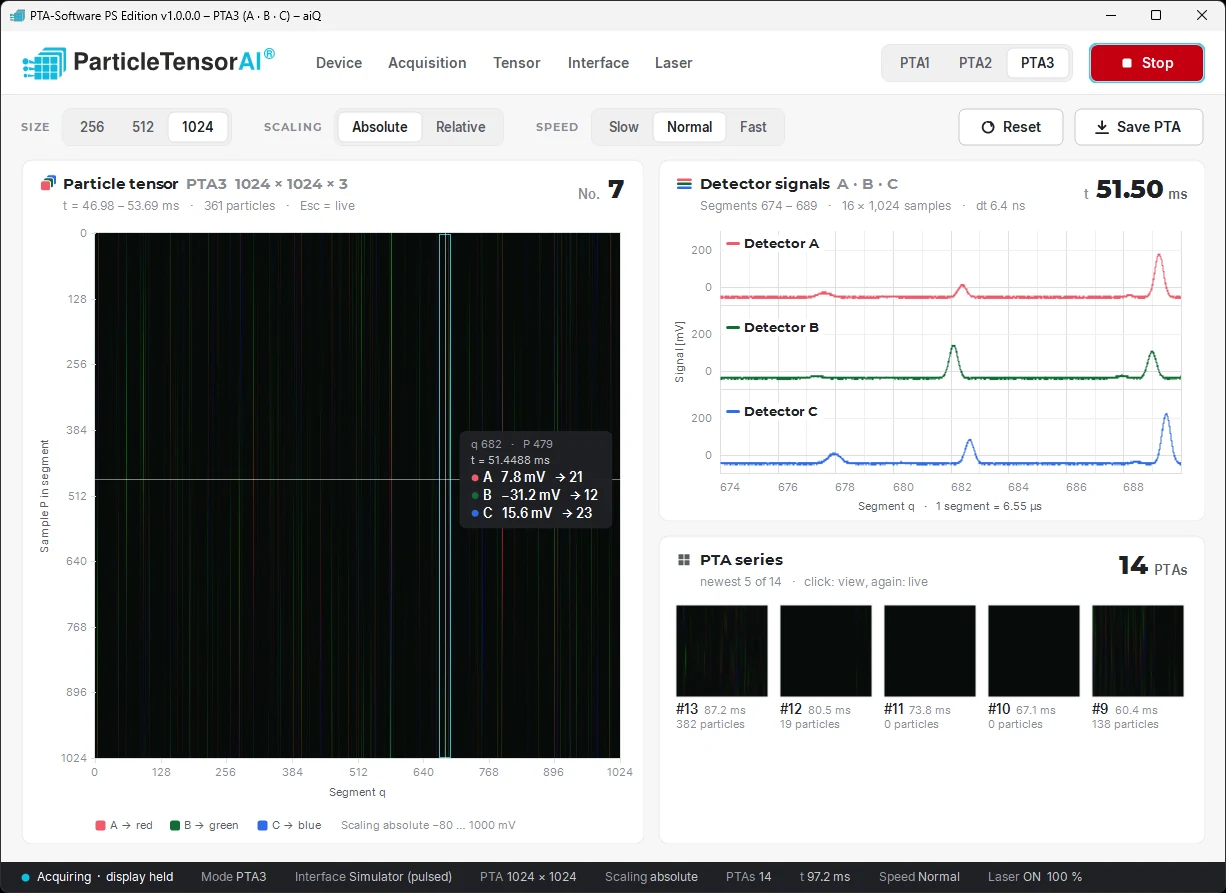
Particle Tensor
The large view shows the current Particle Tensor. The detector signal is divided into segments: the horizontal axis is the segment q, the vertical axis is the sample P within the segment. In PTA3 mode, the signals of detectors A, B and C form the red, green and blue channels of the tensor.
- Time and particles: the header shows the time interval of the tensor and the number of particles it contains. In the example, one segment comprises 1,024 samples at 6.4 ns, i.e. 6.55 µs, so a tensor of 1024 × 1024 covers about 6.7 ms.
- Values at a glance: pointing at the tensor shows segment, sample, time and the signal of each detector in mV together with its tensor value.
- Scaling: absolute with a fixed signal range or relative.
Detector Signals and PTA Series
- Detector signals: next to the tensor, the signals of detectors A, B and C are shown in mV for a section of consecutive segments – the raw data behind the selected position in the tensor.
- PTA series: the most recent Particle Tensors are listed with number, time and number of particles. A click shows a tensor from the series; a second click returns to the live view.
- Saving: Save PTA saves the displayed Particle Tensor.
Operation
The menus Device, Acquisition, Tensor, Interface and Laser contain the settings. Mode (PTA1, PTA2, PTA3), tensor size, scaling and speed are selected directly in the main window; Start/Stop controls the acquisition. The status bar shows mode, interface, tensor size, scaling, number of PTAs, time, speed and laser status.
Download
PTA-Software is available in the Microsoft Store. Installation and first start are described on the download page. For questions about ParticleTensorAI® measurement systems and integration, please contact us.